Morning briefing
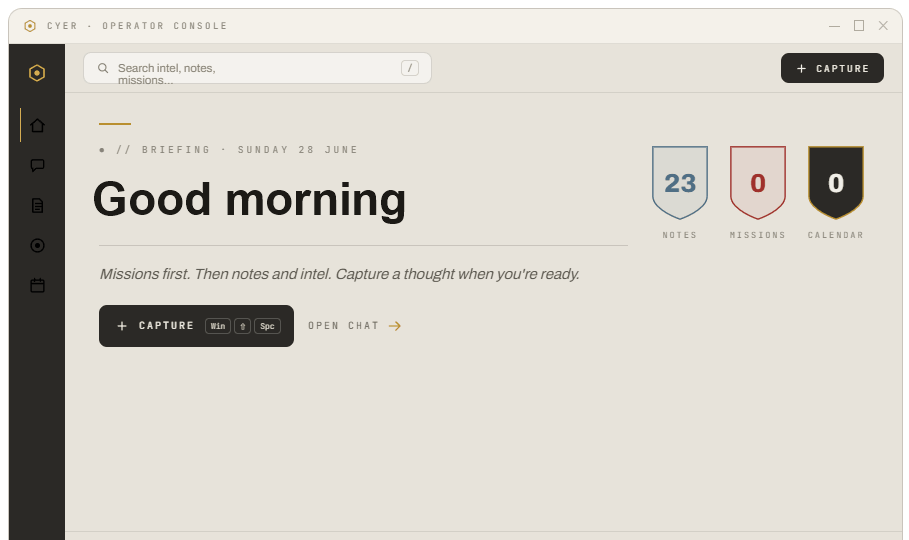
Good morning. 2 meetings today — standup at 9:30, design review at 2.
Your desktop productivity assistant.
Proactive missions on your desktop. Local by default. Bring Claude or Codex when you want AI.
Cyer lives in your system tray and sends calm, timely nudges — morning briefings, mission reminders, and calendar heads-ups (coming soon) — without opening another chat window.
Sample notification stack — illustrative of tray nudges, not a live capture.
Good morning. 2 meetings today — standup at 9:30, design review at 2.
Finish Q3 report — due tomorrow.
You've been in VS Code 90 minutes — still on the Q3 report mission?
Team standup in 15 minutes.
Press a keyboard shortcut to open the command palette — capture a note or start a mission without switching apps. Use WinShiftC for Ask Cyer.
Proactive missions, calm capture, local data, and your own AI — not another chat window.
Due times, status lanes, and tray reminders that reach out before you have to ask — quiet hours keep it calm.
Notes, missions, and daily history stay on your machine. Local-first data — download is free; an account is only needed for billing.
Connect Claude Code CLI, Codex CLI, or Ollama. Cyer orchestrates; you keep your subscriptions — no markup.
From any app, open the command palette and file a note or mission without switching windows.
Cyer ships no model of its own. It connects to the AI you already run — Claude Code CLI, Codex CLI, and Ollama — and can bridge to Claude Desktop via an optional MCP server (Node.js required). Optionally copy context to Gemini in your browser. The intelligence is yours; the orchestration is Cyer's.
 Claude
 Codex
Codex
Claude Code CLI, Codex CLI & Ollama plug straight into Cyer · optional MCP bridge for Claude Desktop
Download the beta, set up in a few minutes, and let Cyer help you stay organized every day.
Install Cyer on your desktop — Windows or Mac (download or build from source). Onboarding walks you through welcome, activity disclosure, and Ask Cyer — news and AI setup live in Settings after install. Calendar sync is coming soon.
Jot notes, add missions, and let Cyer remember what you're working on. Turn on activity logging (Windows, off by default) so briefings, Cyer nudges, and reminders have day context.
Open Cyer for your morning summary, chat with AI if you've connected it, and use quick shortcuts to act without breaking your flow.
Notes, missions, calendar (coming soon), and news in one local console — not four apps fighting for attention.
Start free in beta. Paid plans open Aug 8 — first 100 lock Basic Perpetual at $69 once. Bring your own AI; Cyer never marks it up.
Available now · Windows & Mac · full product access while we ship.
v1 Basic features · not unlimited Pro
or $79/yr · advanced features + priority support
Free during beta. Paid plans begin Aug 8. Basic Perpetual is a one-time v1 license — not lifetime Pro.
Free beta coming soon on Windows and Mac. Join the waitlist for a direct invite — first 100 lock Basic Perpetual at $69 once. We'll email you when a build is ready.
You're on the list! We'll email you about beta access and launch updates.
Unsigned beta installer today — signed installer + automatic updates planned for v1.0. Developers: compile from source on GitHub.
Cyer is your desktop productivity assistant — proactive missions, calm nudges, and morning briefings. Local by default. Bring Claude or Codex when you want AI.
Cyer lives in your system tray and nudges you with briefings, mission reminders, and calendar heads-ups (coming soon) — without opening another chat window. Your data stays local; Claude or Codex are optional.
No. Connect Claude Code CLI, Codex CLI, or Ollama yourself — Cyer never marks up AI costs. Free beta available now. From Aug 8, Basic Perpetual is $69 once for the first 100 (v1 Basic features). Pro is $10/mo or $79/yr for advanced features and priority support within 2 business days.
Your notes, missions, and daily history are stored on your computer — not on Cyer's servers. Data stays local by default. Download is public — no account required. An optional website account manages billing and desktop sign-in across machines. When you connect news or AI providers — and calendar when it ships — Cyer reaches those services only when you ask it to.
Cyer can optionally remember which apps you use (Windows today) to build an activity timeline for briefings and Cyer nudges. Activity logging is off by default — we explain this during onboarding disclosure, and you can turn it on or off in Settings. This data stays on your device.
Cyer desktop beta is available for Windows and Mac. Download the installer anytime — no account required. Free through Aug 8; Basic Perpetual ($69 once for first 100 buyers) and Pro ($10/mo) begin after. An optional account covers plan management and desktop sign-in on every machine. Developers can compile from source on GitHub (Node.js + Rust).
Cyer runs on Windows 10/11 and macOS. Download the installer for either platform — no account required.
For Claude: install the Claude Code CLI and keep your existing subscription. For OpenAI: install the Codex CLI. For free local AI: install Ollama and pull a model. Claude Desktop is optional — useful for the MCP bridge (Node.js required), not required for chat. Configure any of these in Settings after install; setup takes a few minutes.
WinShiftC Ask Cyer · WinShiftY Command palette · WinShiftZ Quick note · WinShiftX Quick mission
Click the tray or menu bar icon anytime to open or hide Cyer. On macOS: ⌘ShiftC/Y/Z/X.